Skip to content
Comparison · family safety

Kunbaa vs Life360: Know They Got Home, Inside a Private Family Space

Kunbaa is for adult families who want to see that Mum got home, then ring her from the same private space that holds the tree, the photos and the birthdays — location sharing that each person turns on, and points at the relatives they choose.

The Kunbaa app's Family Safety map on a phone (test family): three relatives sharing for a while, each with when they last updated
Knowing everyone got home is one part of staying close.

Quick answer

Life360 is a family safety service built around teen drivers and emergencies: crash detection, SOS alerts, driver reports and emergency dispatch on paid plans. Kunbaa is a private, invite-only family space where location sharing is one feature among the tree, the wall, chat and calls — opt-in, chosen per person, free for every member, and for adults only. Families who need crash alerts choose Life360; families who want to stay close, and to know who got home, choose Kunbaa.

How does Kunbaa compare with Life360?

At a glance, as of September 2026. Kunbaa facts describe the current release; Life360 facts are quoted from its own site.

Source: Life360 plans, features and US prices as shown on life360.com/plans-pricing and support.life360.com, read on 17–18 September 2026. Kunbaa facts describe the current release. Details change; check Life360’s site for today’s plans and prices.
ComparedKunbaaLife360
Built forA private space for the whole family: the tree, the wall, chat, calls, events — and a Live Map for the relatives who choose to shareFamily safety first: live location, driving safety and emergency help, with paid plans built around teen drivers and protection services
Live locationComing soonA Live Map of the relatives who turn sharing on. Off for each person until they switch it onA live map of everyone in your Circle
Who sees youComing soonYour choice: the whole family, or only the relatives you pick. Pause or stop whenever you likeEveryone in the Circle. Turning sharing off shows "Location Sharing Paused" to that Circle
Sharing for a set timeComing soonA timed live share of 15 minutes, 1 hour or 8 hours keeps updating with the app in the background and ends on its own, on iPhone and AndroidSharing is continuous while it is on
With the app closedComing soonOn iPhone, choose Always: about once an hour and when you move a meaningful distance, after an in-app explanation and your phone's own prompt. Always is not available on Android in this release; there, While using updates while Kunbaa is open, and a timed live share keeps updating in the backgroundLocation updates in the background; crash detection needs the Always permission
Places and alertsComing soonSaved places — home, school, care, work — with arrival and departure alerts, free for everyonePlace alerts: 2 places on Free, 5 on Silver, unlimited on Gold and Platinum
Location historyComing soonNone to browse. Arrivals and departures at saved places are listed for 7 days, then deleted2 days on Free, 7 days on Silver, 30 days on Gold and Platinum
Crash detection and SOSNone. Kunbaa is not an emergency or safety-monitoring service — in an emergency, call your local emergency numberCrash detection and an SOS alert to your Circle on Free; emergency dispatch on paid plans (US, Canada, UK, Australia and New Zealand)
Driving, items, identityNoneDriver reports and roadside assistance on Gold and Platinum; Tile tracker support; ID theft protection and travel and medical assistance on the top plans
Talking to each otherComing soonGroup and one-to-one chat, one-to-one voice and video calls, and group calls of up to 4 people including you free (up to 6 on Kunbaa Plus) — in the Kunbaa app, coming soon to the storesEmoji Quick Notes; in-app messaging was replaced by buttons that open your phone's own call and text apps
Kids and teensAdults only — every account is 18+. Children are on the tree, added by adults, and share nothingFamilies with children and teen drivers are a core audience
What the safety features costFree for every family member, with no cap on how many relatives share or viewFree plan, then Silver $9.99/mo or $99.99/yr, Gold $16.99/mo or $169.99/yr, Platinum $24.99/mo or $249.99/yr (US); paid plans cover everyone in the Circle

Who is Kunbaa for?

Adult children of ageing parents

Dad has a hospital appointment across town and you are three suburbs away. On Kunbaa he shares his location with you for 8 hours, you see him get home, and you ring him from his page on the tree. He decides who sees him, and he can stop at any time.

Families spread across countries

When your sister lands in Melbourne after the long flight, the Live Map shows it before she has found her bags — and the family chat is one tap away to ask how it went. Sharing is opt-in for each person, in every country.

Privacy-first parents

Your children's photos should reach the family, and stop there. Kunbaa is invite-only, carries no ads and sells nobody's data; you choose who each post reaches, and every account is held by an adult.

What you keep, and what you give up

Life360 is good at its job. This is the plain list of what changes if your family moves this part of its life to Kunbaa.

What you keep

  • A private, invite-only space: no ads, nobody's data sold, nobody outside the family sees a thing.
  • Location sharing that each adult turns on for themselves and points at the relatives they choose.
  • Saved places with arrival and departure alerts, free for everyone, with no plan tiers.
  • The tree, the wall, events, chat and calls in the same place as the map.
  • One person pays for Kunbaa Plus when the family wants room for the whole archive; everyone else joins free.

What you give up

  • Crash detection, SOS alerts and emergency dispatch. Kunbaa has none of these.
  • Driver reports, roadside assistance, Tile tracking and identity protection.
  • A location history you can look back through — Kunbaa keeps only 7 days of arrivals and departures at saved places.
  • Accounts for teenagers. Kunbaa accounts are 18+, so it cannot follow a teen driver.
  • Always sharing for Android users. In this release Always is on iPhone only; Android shares while the app is open, or during a timed live share.

What Kunbaa does, in detail

Family Safety: the Live Map, saved places and alerts

Family Safety is off for everyone until they turn it on. Each person picks their audience — the whole family or just the relatives they name — and can pause or stop at any time. Saved places send an arrival or departure alert, so "Mum is home" arrives without anyone asking. Sharing for a set time — 15 minutes, 1 hour or 8 hours — ends by itself.

How Family Safety works →
Illustration of a relative arriving safely at a saved place
Arrival and departure alerts at the places your family saves.

Calls that only family can place

A Kunbaa call starts from a relative's page on the tree. Only the people in your family space can ring you, so nobody hands out a phone number. Voice and video are one-to-one, and a group call holds up to 4 people including you free — up to 6 on Kunbaa Plus. Calls arrive with the Kunbaa app, coming soon to the App Store and Google Play.

Chat and calls in Kunbaa →
Two phone screens from the Kunbaa app: a private one-to-one thread with a voice call button and a recent call, and the call screen ringing the same relative

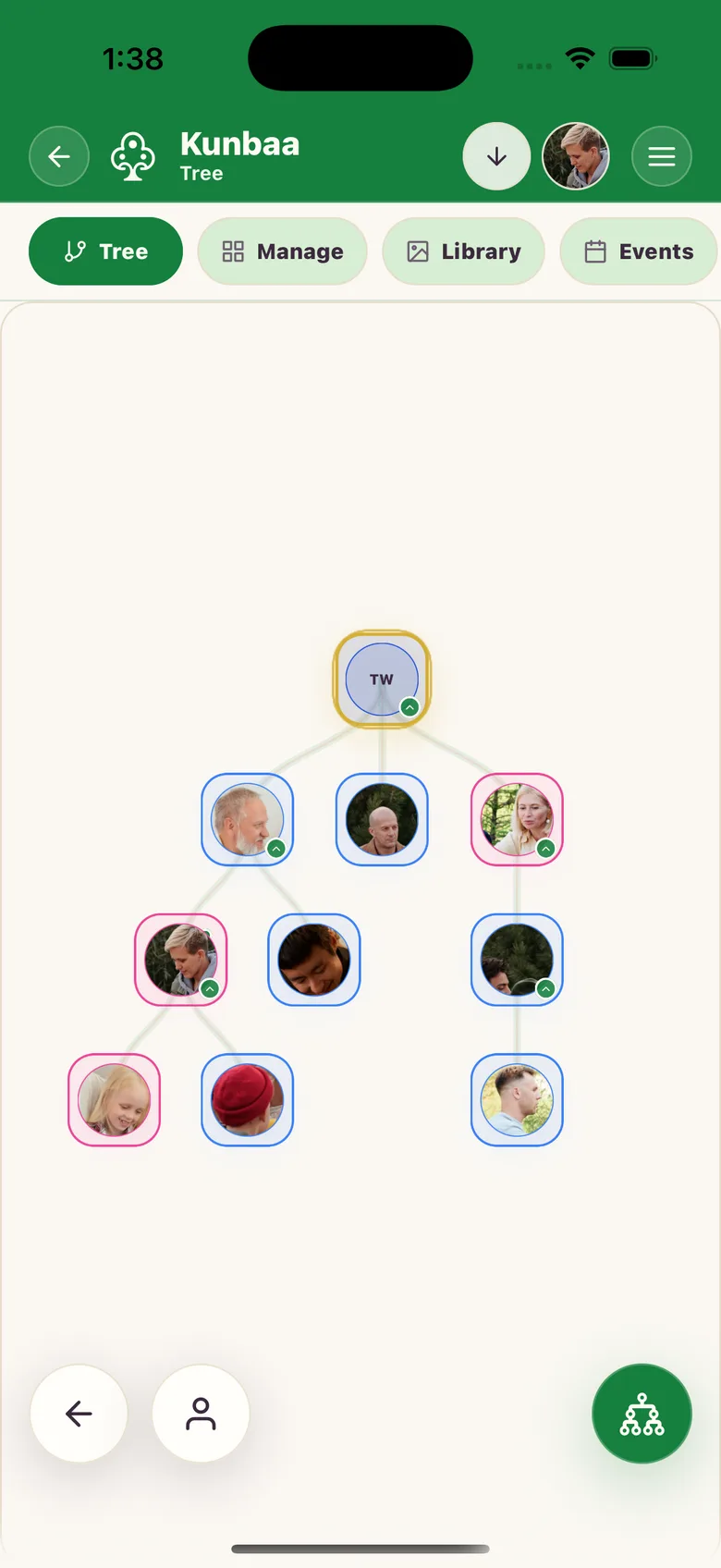
A tree of the living family

Everyone you invite gets their own place on the tree and their birthday on it. Relatives add their side, fix a wrong date, and add the cousins you have never met — and a child added by an adult is on the tree without holding an account.

The Kunbaa family tree →
The Kunbaa family tree on a phone: four generations of the Walsh family with a photo on each person
The tree on iPhone — four generations, photos on each person.

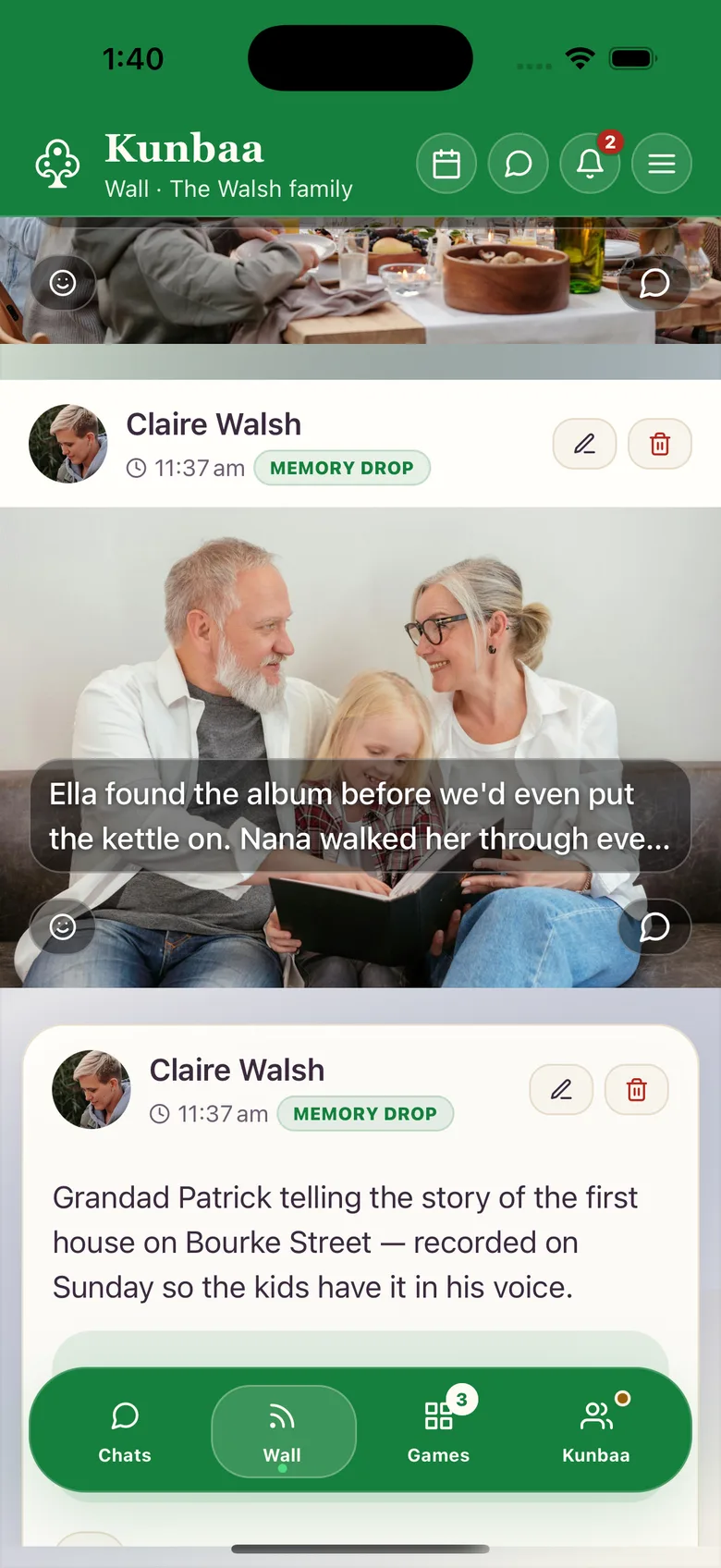
The family wall, with an audience for every post

Photos, videos, stories and voice notes go on the wall with the names, the place and roughly when written in the caption. Each post reaches the audience you choose: everyone in the family, the extended family, or just your household. Memory Lane lets the family look back through it all.

The wall and Memory Lane →
The Kunbaa family wall on a phone: a captioned photo of grandparents reading an album with their granddaughter, and a voice-note post beneath it

Permissions an admin sets, per relative

An admin decides, for each member, whether they can post to the wall, add people to the tree, or message members — and a relative can request more access from inside the app. Every account is held by an adult, so the people who can see the map are the people you invited.

How private is Kunbaa? →

Kunbaa vs Life360: your questions

Is Kunbaa a Life360 alternative?

For adult families, often yes. If what you want is to see that your parents got home or that your brother landed, and then message or call them inside one private family space, Kunbaa's Family Safety does that, free for everyone. If you need crash detection, SOS alerts, emergency dispatch, driver reports or roadside assistance, Kunbaa has none of those; Life360 is the safety service, and some families use both.

Does Kunbaa have crash detection or an SOS button?

No. Kunbaa has no crash detection, no SOS or emergency alerts and no emergency dispatch. It is not an emergency or safety-monitoring service, and a shared location can be delayed or out of date. In an emergency, call your local emergency number. Life360 offers automatic crash alerts, including on its free plan.

Who can see my location in Kunbaa?

Only the relatives you choose. Sharing is off until you turn it on. Then you pick an audience — everyone in your family space, or just the people you select — and you can change it, pause or stop whenever you like. Nobody outside your family space can see it, and Kunbaa never sells location data.

Can I share my location with family for a set time?

Yes. Share your live location for 15 minutes, 1 hour or 8 hours, in Family Safety or into a chat. A timed live share keeps updating with the app in the background on iPhone and Android, needs no Always permission, and ends by itself when the time is up. You can stop it early at any time.

Does Kunbaa share my location when the app is closed?

On iPhone, yes, if you choose Always: Kunbaa explains what it collects, your phone asks for permission, and then it shares about once an hour and when you move a meaningful distance. Always is not available on Android in this release; there, While using updates while Kunbaa is open, and a timed live share keeps updating in the background until it ends.

Can I use Kunbaa to keep track of my teenager?

No. Every Kunbaa account is for adults aged 18 and over, so a teenager cannot hold an account or share a location. Children can be on the family tree, added by an adult. For teen drivers, Life360's paid plans are built for exactly that.

Can I use Family Safety today?

Family Safety, chat and calls arrive with the Kunbaa mobile app, which is coming soon to the App Store and Google Play; join the waitlist below and we will email you when it is out. The family tree, the wall and events already work on kunbaa.com, free.

What does Kunbaa cost next to Life360?

Family Safety — the Live Map, saved places and alerts — is free for every member of the family, along with the tree, the wall, chat and calls. Kunbaa Plus is $15.99 a month or $159.99 a year, paid by one person, and is what keeps the family's photos, videos and stories: longer videos, room for the whole archive, and chat photos kept while the family is on Plus. Life360's safety features start on its free plan and grow across Silver, Gold and Platinum.

More questions? Read the full FAQ or what private means in Kunbaa.

Know they got home. Keep the rest of family life in the same place.

Start the family tree on the web today and invite the people who matter. Family Safety, chat and calls join it in the Kunbaa app — free, opt-in, and only ever visible to the relatives each person chooses.

Everyone in the family joins free. When you want room for the whole archive, one person takes Kunbaa Plus at $15.99 a month or $159.99 a year — about $13 a month for the whole family.

Coming soonFamily Safety arrives with the Kunbaa app, coming soon to the App Store and Google Play.

We’ll email you when it’s ready. No spam, and you can unsubscribe any time.

Keep reading